StuntBase
Go to top
Home • Forum • Check your PM • Register • Log in
Go to top


Calendar 
         
Board Navigation
Go to the homepageHome
Index of the forum.Forum
PressPress

Downloads
Check articles uploaded to the websiteKnowledge Base
Read the rules of this websiteRules
Members of our staffStaff
Frequently Asked Questions.FAQ

Search through forums.Search Forums
Search trough downloadsSearch Downloads
Search_kb_extendSearch KB

Recent Topics
» Testing NEW era for stuntbase.com
by Waynder on Wed Feb 13, 2013 6:29 pm

» [ KB ] Carb jets
by Waynder on Wed Feb 13, 2013 6:27 pm

» [ KB ] How To Use StuntBase E-mail
by Waynder on Wed Feb 13, 2013 6:25 pm


User Info
Username:

Password:

 Remember me


I forgot my password

Don't have an account yet?
You can register for FREE


Knowledge Base
Click on Category to add Article   Search

 Quick Stats 
:: Most Popular :: Toprated Articles :: Latest Articles ::

Author Waynder Date Sat Aug 12, 2006 3:57 pm Views 5892
Description How to make simple stuff at home if you dont have accsses to ploter
Category Exterial modifications for stunting Type Structure Modifications
Rating No votes [Rate Article]
Home made stickers
Stuff that you need
Printer
Sticker sheet (can be found in ani paint store)
Paitentce (for cutting small pieces out =) )

Find on internet or somewhere, font or picture you want to use as sticker (there are few template links at the end of post).
The best way is to open picture or write text (with wanted font) in MS Pintbrush and there setup the size you want (It can be also dome with better, more proffesionl tools, but i'll try to keep it simple).
When u resize the pic/word the way you want, select all with mouse and invert selected items...

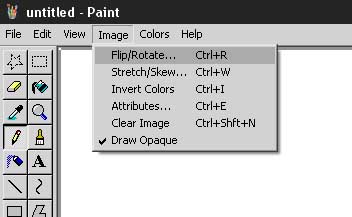
Click on IMAGE --> FLIP/ROTATE


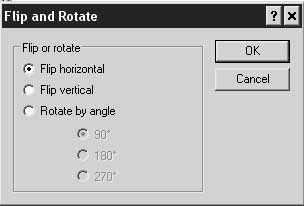
This menu will open. Then click and confirm on FLIP HORIZONTAL


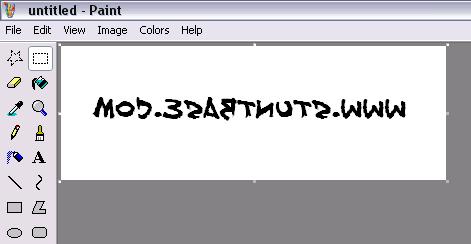
And viola! You'll get inverted item.


You have to invert image becouse you are printing on sheet that has plain paper on one side (printing side) and plastic surface on other side (you can buy that sheet in any store where are paint stuff). And becuse you will print item on paper side, after cuting it out and sticking it it will look the way as it has to.
After you have printed all out, cut onyl the parts that are printed on... all the rest u dont need.

Becuse somethimes there can be a lot of small pieces its recomended to print the sample of sticker to plain paper so you can watch where each part goes when you're sticking the stuff on scooter


SAMPLES FOR STICKERS

Fontovi

http://www.1001fonts.com


Templats

http://www.aprilialand.com/pictures/stickers <-- Kanji (Japanise sings)

http://www.scooter-center.com/catalog/default.php?cPath=4402&PHPSESSID=da194d4192e2b67c55fa7abf6f24d3fc

http://www.redracingparts.com/en/english.htm

http://www.stickergiant.com/Merchant2/merchant.mv

http://www.logotypes.ru

http://www.motoshopper.com/s/shop/list.asp?catalog=sticker&sec=STICKERS

http://www.motomanuali.com/stickers%20moto.htm

http://www.STICKERS.X.L.PL
  
Rating No votes[Rate Article]
Quick KB Navigation 

You cannot post new articles in this category
You cannot edit your articles in this category
You cannot delete your articles in this category
You cannot comment articles in this category
You can rate articles in this category
Articles need no approval in this category
Article edits need no approval in this category

Powered by Knowledge Base MOD, wGEric & Haplo © 2002-2005
PHPBB.com MOD

MyCookies Manager

Go to top
Home • Forum • Check your PM • Register • Log in
Go to top
Lo-Fi Version
Protected by CBACK CrackerTracker :: 114300171016 Attacks blocked.
Protected by phpBB Security © phpBB-Amod ::  phpBB Security ©  Has Blocked 3,496 Exploit Attempts.
  [ Style Courtesy of :: Chucklehead :: All times are GMT + 1 Hour ]
 @ 2007 The Integra Team
 @ 2007 phpBB Group

[Page generation time: 0.6416s (PHP: 20% | SQL: 80%) | SQL queries: 56 | GZIP disabled | Debug on]